On this page
“We need a customer portal” is a starting point, not a description of what a developer should build. Two people can agree on those words while imagining different users, records and responsibilities. A useful web application brief makes those differences visible before the team estimates screens and features.
You do not need to choose a programming language or write a complete technical specification. Start with the operational problem, the people involved and examples of what they must be able to do. Leave room for a supplier to recommend an existing tool, a smaller first release or further discovery.
Use one problem to define the first release
Consider a fictional equipment-service business. Customers email staff to ask whether their repair has arrived, is being assessed or is ready for collection. The owner wants a portal where customers can read the current status. This is a planning example, not a Codoki Studio client case study.
The first release could show repair requests, agreed status labels and customer-facing notes. Payments, appointment scheduling and automated decisions are excluded from this example. An existing shared system may still be sufficient; the brief should help compare that option with a custom application, rather than assume a build is necessary.
Describe how work happens today and where the information comes from. If staff maintain a separate job system, decide whether they will update both systems manually or whether an integration needs investigation. “Connect to our system” remains an open question until access, data and technical suitability have been reviewed.
Name the records before drawing the screens
In this example, the central record is a repair request. It has an identifier, a customer, a current status, a customer-facing note and a separate internal note. That distinction matters: a screen called “job details” does not explain which information each person should see.
Use fictional records in early discussions. For example, request R-104 belongs to Customer A and is awaiting approval; R-105 belongs to Customer B and is ready for collection. Agree what each status means and who may change it. Also identify which system is the source of truth when two systems hold a copy.
Make a small roles and permissions matrix
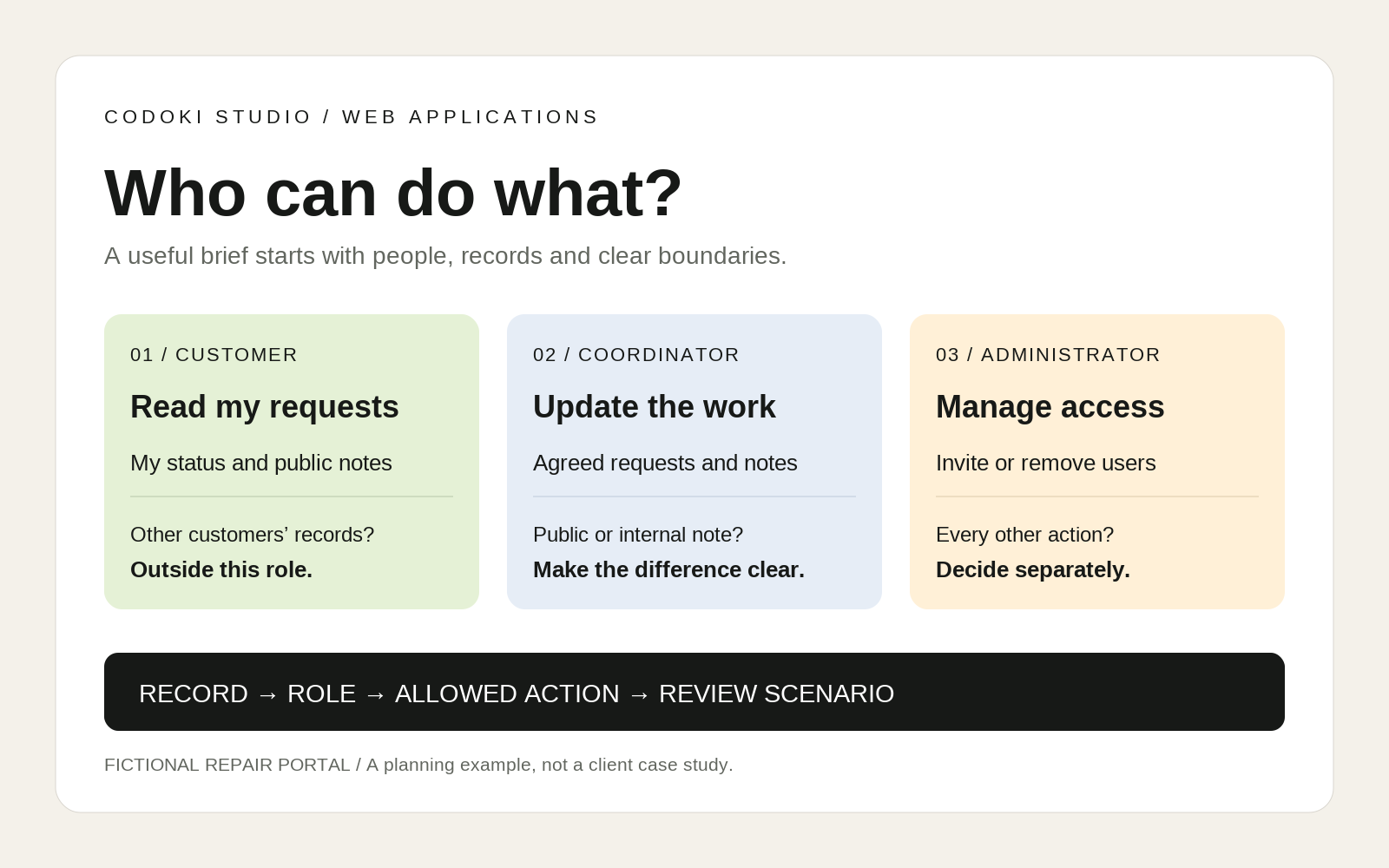
For each role, write down the records it can reach, the actions it can take and the actions it must not take. The following is an illustrative matrix expressed as a short list; change the boundaries to fit the actual operation.
- Customer: views their own requests and customer-facing notes; can ask for a correction. Cannot view another customer’s requests, read internal notes or change the operational status.
- Service coordinator: views the requests covered by their agreed responsibilities; changes status and writes internal or customer-facing notes. User administration is excluded unless explicitly assigned.
- Account administrator: invites or removes authorised users. Decide separately whether this role also performs operational work; the title alone should not grant every action.
Resolve awkward cases while the example is small. Can two people from one customer organisation see the same requests? What happens when someone changes employer? Can staff reassign a request to another customer? Record decisions and uncertainties separately. These questions can change the work even when the page count stays the same.
Turn requirements into four review scenarios
An acceptance scenario describes a starting situation, an action and an expected result. It gives the buyer and supplier something specific to review. For the fictional portal, a first set might be:
- 1Separate customer records: sign in as fictional Customer A and open R-104. Then try the agreed test link for Customer B’s R-105. A should see their own request and be prevented from accessing B’s record.
- 2Separate public and internal notes: a coordinator updates R-104 to “awaiting approval” and adds both kinds of note. The customer sees the agreed status and customer-facing note; the internal note stays within the authorised staff view.
- 3Remove access: an administrator removes a test user. Demonstrate the agreed outcome when that user returns, including what happens to an existing signed-in session. Record the intended behaviour before assessing it.
- 4Handle an unsuccessful update: in an agreed safe test environment, demonstrate a status change that cannot be saved. The interface should not claim completion. Agree how a retry works and how the team recognises the saved result.
Use test accounts and fictional data with the supplier’s agreement. A prototype can help everyone review the journey and wording, but it does not prove that the finished application enforces access rules. Ask what implementation evidence and additional testing are needed. These four examples are a discussion aid, not a complete security assessment.
Copy a short brief into your next discussion
Keep the opening brief readable. You can copy these prompts into a document and answer them in plain language. Attach the roles list and review scenarios rather than hiding them inside a long feature list.
- Problem: what happens today, who is affected and why it needs attention.
- First release: the smallest useful change and the actions deliberately excluded.
- People and records: each user role, the information it needs and the actions it may perform.
- Existing systems: where the records live, which source is authoritative and what access or integration questions remain open.
- Review scenarios: a starting situation, action and expected result for each important requirement.
- Decisions: what is agreed, what remains open, who decides and when that decision is needed.
- Constraints: the budget range, any fixed date and its reason, plus who will operate and support the system after launch.
A useful next conversation should expose assumptions and alternatives. Ask the supplier which parts can be estimated, which need discovery and which could be simplified. Once those decisions are understood, the proposal can describe the agreed deliverables and review points. The brief starts that process; it does not replace a detailed specification or agreement.