On this page
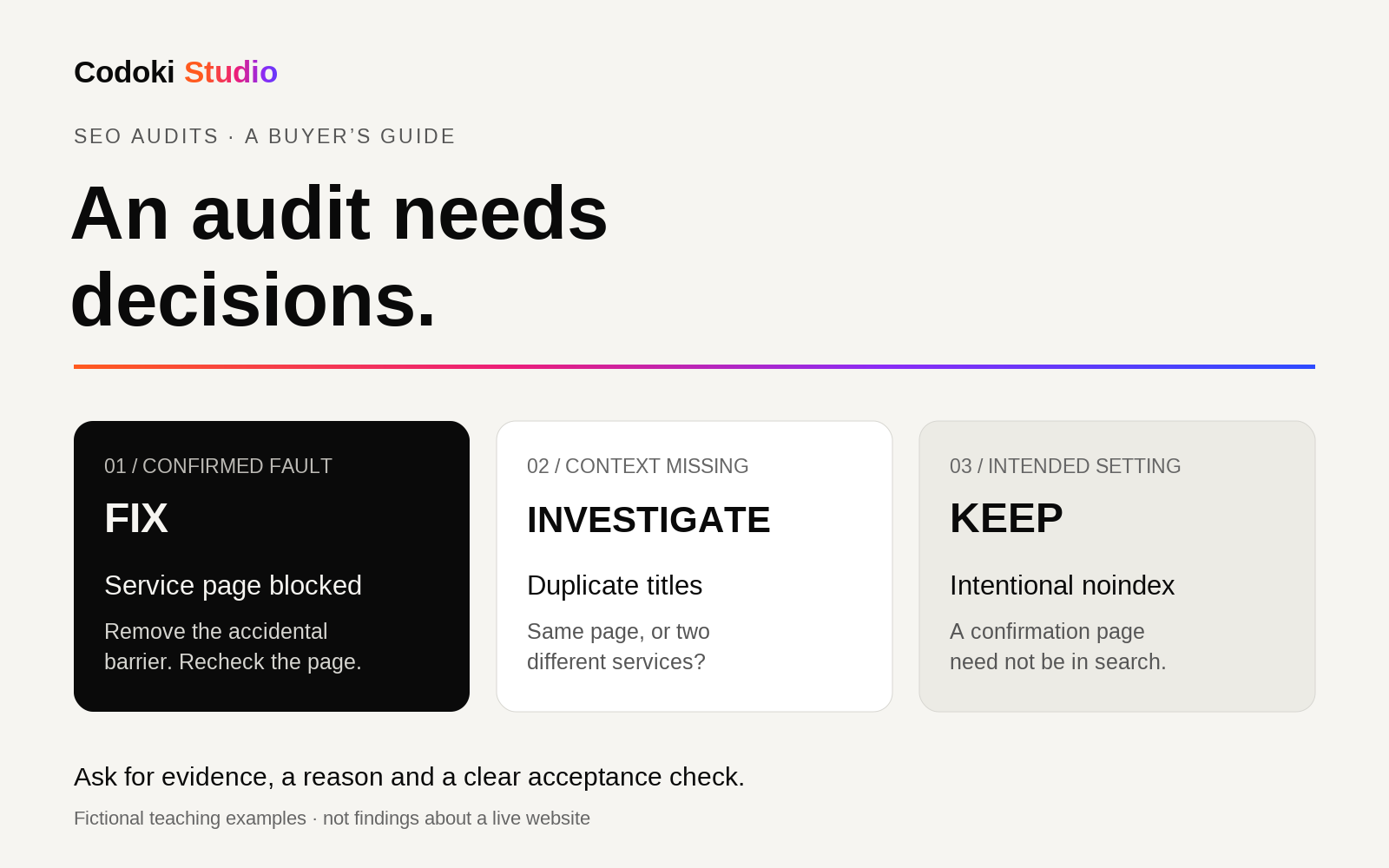
Before approving fixes from an SEO audit, ask for the affected page, the evidence and the intended result. A warning count does not tell you whether a change is needed. The same “noindex” finding can describe an accidental barrier on a service page or an intentional setting on a confirmation page. Paying to remove both would turn one repair into a new mistake.
This guide is for business owners reviewing recommendations before implementation. It does not replace a technical investigation or cover every audit check. The aim is to turn a finding into a decision you can inspect: what changes, who owns it, and what evidence will show that the agreed work is finished.
Finding one: an intended service page has noindex
The audit reports a noindex directive on the repair service page. The owner confirms that this is a public service they want customers to find in search. The supplier checks the current page response and rendered page, records the directive and confirms that it is not merely an old scan result. They also inspect the URL in Search Console, keeping the indexed-page information separate from a live test.
The evidence now supports a specific repair. Identify which page setting, template or deployment rule introduced the directive, then change that source. Do not just remove the word from one screenshot or edit a generated file that the next release will replace. If a shared template caused it, examine the affected group and its intended exclusions before applying a wider change.
- Decision: remove the unintended directive from the agreed public service page and correct its source.
- Owner: the website developer implements; the business owner confirms the page’s intended public purpose.
- Acceptance: check the published URL again, record the relevant response and rendered-page checks, and confirm that the intended page is accessible to Google without the noindex directive.
- Unfinished work: if the setting returns after deployment, the repair has failed. If nobody has checked the published page, record “not tested”, not “complete”.
Google must be able to crawl a page to see its noindex directive; blocking crawling in robots.txt is not a replacement for noindex. Removing an unintended directive also does not guarantee indexing or a particular rank. Keep the technical repair, an indexing request and Google’s later indexing decision as separate records.
Finding two: a thank-you page has the same warning
The next row describes a generic page shown after an enquiry. It contains no customer details and is intentionally excluded from search. The business does not want someone arriving there from Google to mistake it for confirmation that they have submitted an enquiry. This is a different decision even though the audit tool uses the same warning label.
- Decision: retain the intentional noindex setting; do not add this page to the sitemap merely to clear a tool warning.
- Owner: the website lead records the exclusion and its purpose so a later audit does not reopen it without context.
- Acceptance: check that the agreed exclusion persists and that the actual enquiry journey still reaches the correct confirmation after a valid submission.
- Unfinished work: a working confirmation screen alone does not verify that the enquiry reached its intended destination; retain that delivery check separately.
Noindex is a search instruction, not access control. Anyone with a publicly accessible URL may still be able to open it. Do not put personal enquiry information in a confirmation URL or rely on search exclusion to protect private records. A page containing restricted information needs an appropriate access design, not just a different SEO setting.
Finding three: two URLs have the same title
The audit flags duplicate titles on the repair and maintenance pages. Before rewriting them, open both pages and compare their purpose and content. In this example, repair is for an existing fault, while maintenance is planned servicing. If the pages genuinely explain those different services, the fix may be clearer, distinct titles that accurately describe each page, supported by the headings and visible content.
A different pair might be two URL variants showing substantially the same page. Giving those variants different titles would not resolve the underlying duplication. Ask the supplier to establish the intended preferred URL, how the variants arose and whether redirects, canonical signals or internal-link corrections are appropriate. A canonical annotation is a signal to Google, not a guarantee of its selection. Do not point unrelated service pages at one canonical URL simply because their titles match.
- Decision: investigate page purpose first. Approve a title/content correction for distinct pages, or a separately scoped duplication fix for equivalent variants.
- Owner: the content owner confirms the services and wording; the SEO lead and developer agree any URL or template changes.
- Acceptance: verify the saved public titles and content for the intended URLs. For a duplication change, check the agreed redirects, canonical signals and internal links rather than counting renamed titles.
- Unfinished work: if the two pages have not been reviewed, the recommendation remains “investigate”. Do not mark a canonical change as accepted from a title-checking tool alone.
Google can generate a search-result title link from several sources. A corrected HTML title is a deliverable you can test; seeing that exact wording in every search result is not something the supplier can promise.
Approve the scope, not a promise to clear every warning
An audit can identify a problem without including the work to resolve it. Before authorising implementation, use these five checks to agree a manageable scope:
- 1Purpose and evidence: which customer task or search opportunity is affected, which URLs were checked, and what supports the recommendation?
- 2Action and boundary: what will change, what will stay intentionally excluded, and does one template change affect other pages?
- 3Content and relevance: does the page actually answer the intended buyer’s question? A technically accessible page can still explain the wrong service or leave important buying information unanswered.
- 4Authority and claims: if the audit recommends reviews, profiles or editorial coverage, distinguish legitimate relevance from raw link counts. Record eligibility and evidence; do not invent reviews or promise independent coverage.
- 5Owner and acceptance: who implements, who supplies business facts, what dependencies must be resolved, and which live checks determine pass, fail or not tested?
Group repeated template findings into one investigated cause and an appropriate verification set. Ten affected URLs do not automatically mean ten separate fixes, but checking one convenient page does not establish that every variant works. Agree how the supplier will check affected pages and exceptions, especially before changing URLs or site-wide settings.
Keep delivery evidence separate from search results
Finish the implementation record with the changed URLs, publication date, checks performed and unresolved items. Keep a safe fallback appropriate to the change. Then choose a later reporting window for search observations; a passed technical check is not evidence that traffic or enquiries improved. The progress report should explain both the work delivered and what subsequently happened, including uncertainty.
You do not need to understand every crawler setting to approve useful SEO work. You do need a clear explanation of why each change belongs in the scope. The strongest recommendation may be to fix one issue, investigate another and deliberately leave a third setting alone.