On this page
A new website can look finished while important parts of the old one have no agreed destination. Before approving a replacement, ask for a migration plan that explains what will happen to existing pages and how the business will check the result. A launch date alone cannot answer those questions.
This guide uses a fictional UK garden-room installer replacing its website. The business keeps its domain, changes some page addresses and simplifies its service descriptions. It is an illustrative planning exercise, not a customer case study or a promise that every migration follows the same process.
Start with decisions about existing pages
The owner and supplier make a shared list of existing addresses. Alongside each address, they record the current purpose, proposed destination, reason for the decision and person who will check it. Include useful pages reached through old emails or saved links, as well as pages in the navigation.
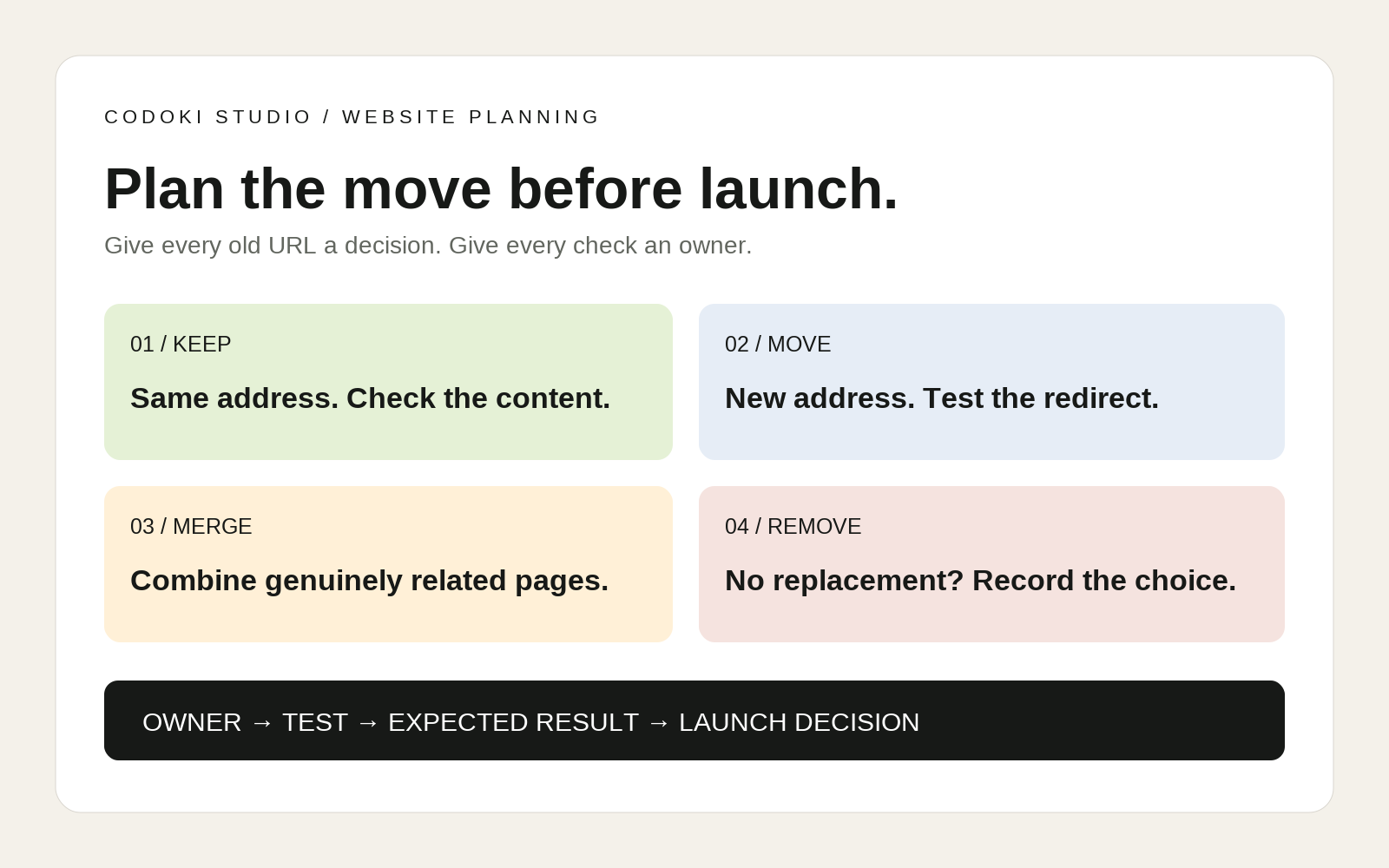
In the example, the team agrees four different outcomes. These decisions need checking against the real content; a similar page title is not enough to establish that two pages answer the same need.
- Keep: /services will remain /services. The owner checks that its service overview and next steps survive the redesign.
- Move: /contact-us becomes /contact. The supplier sets a permanent server-side redirect to the new contact page, and the coordinator tests the old address.
- Merge: /garden-office and /home-office describe the same garden-room service. After confirming that the combined page preserves their useful information, redirect both to the relevant /garden-offices page.
- Remove: /summer-open-day describes an event that has ended, with no equivalent replacement. Return an appropriate 404 or 410 response rather than redirecting it to an unrelated homepage.
Review unresolved rows before launch. For example, an old brochure download may still appear in a printed leaflet. The owner must decide whether to retain that resource, replace it with a genuinely relevant version or accept that the old link will no longer work. Record the choice rather than silently dropping the file.
Will changing website hosting affect your email?
Changing a website host does not necessarily mean changing your business email provider. The answer depends on which services move and which settings change. Before launch, ask the supplier to separate the domain registrar, the service hosting your DNS records, the website host, the mailbox provider and the service that sends contact-form messages. One company may supply several of these; do not assume they are one account or one job.
In our fictional garden-room business, the website is moving to a new host while the existing business mailboxes should stay. The owner asks for a short change record showing what stays, what moves and who checks each dependency. “Email is unchanged” needs supporting detail if the supplier also plans to change the DNS host or nameservers.
- Domain registration: confirm whether the registrar changes. Do not assume a website move includes transferring the domain.
- DNS hosting: state whether the existing DNS service remains. If it changes, the responsible supplier should identify and preserve the records needed by the retained email service, using that provider’s current instructions.
- Mailboxes: confirm the provider and existing mailboxes remain in place. Moving messages, accounts or aliases is a separate scope if the business actually wants a new email service.
- Website enquiries: identify how the new contact form sends messages and where they should arrive. Keeping a mailbox does not demonstrate that the new form delivers to it.
Agree controlled checks with the people receiving test messages: an inbound message reaches the intended business mailbox, an outbound reply reaches the agreed recipient, and a clearly labelled website enquiry reaches its specified destination. Record the time, expected result, actual result and unresolved issue for each check. Use test details rather than customer correspondence, and keep account credentials and private settings out of the shared launch record.
Ask the supplier to check the email provider’s required routing and authentication records, including MX, SPF, DKIM and DMARC where applicable. Their values depend on the actual services. Do not copy generic settings from a guide. If email is bundled with the old website plan, confirm what cancellation would remove before ending it; moving website files or changing mail routing does not transfer stored messages.
The supplier should explain the change sequence, dependencies and fallback before release, including who can restore settings if checks fail. Avoid promising instant or disruption-free changes. A website homepage loading successfully is not evidence that email and form delivery are working.
Give each launch check an owner and a result
Turn the plan into a small acceptance record. Each row needs a named person, a specific test, its expected result and a place to record what happened. “Check the website” is too broad: nobody can tell whether it includes an old link, a mobile enquiry or a failed submission.
- 1Business owner — open each priority service page and confirm its scope, contact details and next step. Record the page address and any correction still needed.
- 2Supplier — test the agreed old addresses and record the actual destinations or removal responses. Check that navigation links point directly to the intended new pages.
- 3Office coordinator — follow the customer enquiry journey on a phone-sized screen and confirm that an agreed test enquiry reaches its intended destination.
- 4Launch approver — review the outstanding issues and record whether the release can proceed, who will resolve each issue and which failures require a delay.
Test enquiries without collecting visitor behaviour
Agree a controlled test with the person receiving enquiries. Use clearly labelled fictional details and a test inbox or safe test environment where available. Check both the confirmation shown to the sender and the message received by the business. A success banner alone does not demonstrate delivery.
Ask the supplier to demonstrate the failure path safely before launch: what does the customer see if sending fails, and can they try again? Avoid deliberately disrupting production services. The acceptance record needs the test, time and result, not customer records or visitor tracking. Remove test data under the agreed handling process.
Agree the fallback before it is needed
A backup is useful only when someone knows what it contains and how it can be restored. Ask who can authorise a rollback, who performs it and what happens to enquiries or content created after the backup. Restoring an older copy may overwrite newer work; do not assume every change can be reversed independently.
Separate launch approval from search results
Before release, check that production pages are crawlable and use the intended canonical addresses and sitemap entries. After release, review important URLs and Search Console reports. Google may show temporary ranking fluctuations while processing a move; a sitemap or indexing request does not guarantee indexing or unchanged traffic.
Agree who will review the first post-launch findings and how problems will be reported. The business can approve evidence that its agreed pages and enquiry journeys work. That is a clearer decision than treating a redesigned homepage as proof that the whole migration is complete.