On this page
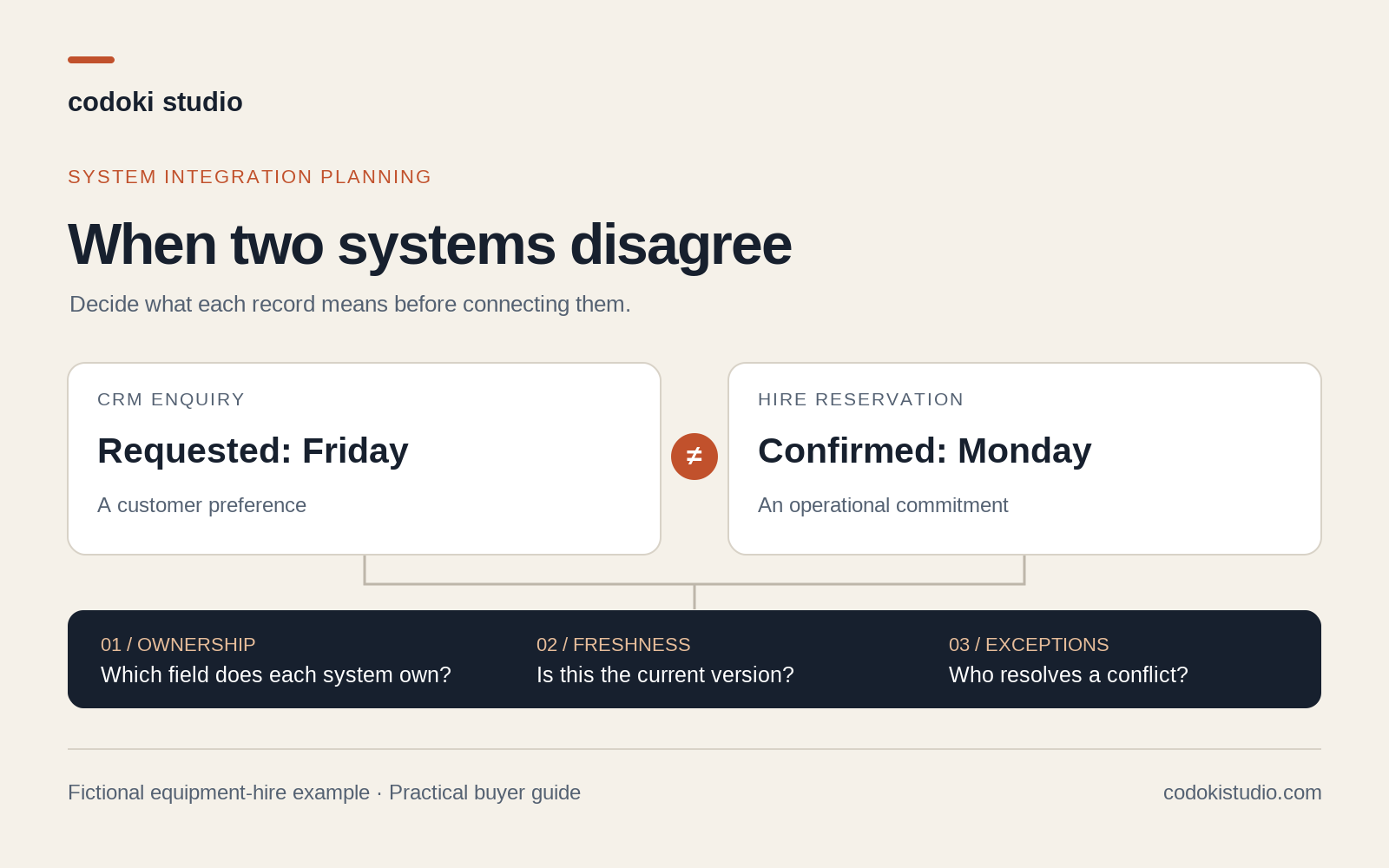
Your CRM says the customer wants equipment on Friday. The booking system says the confirmed hire starts on Monday. Connecting the two systems does not tell you which date to use. Before commissioning a system integration, agree what each record means, who may change it and what should happen when the records disagree.
This is a planning exercise for small businesses connecting a website, CRM, booking tool or accounting package. A useful integration brief describes the decisions between systems as carefully as the information moving between them.
Start with the customer promise
Northfield wants its team to see confirmed hire dates in the CRM without copying them manually. A customer requesting Friday is expressing a preference; a reservation for Monday is an operational commitment. Calling both fields “start date” hides this distinction. Use separate names: requested start date and confirmed start date.
Write the intended outcome in one sentence: “When a reservation is confirmed or changed in the hire system, show its confirmed dates against the matching CRM enquiry.” Then state what the integration cannot do: a CRM edit must not reserve equipment or change an existing hire. That boundary is part of the scope.
Give each field an owner
A source of truth is the place authorised to settle a particular question. It need not be one application for the entire business. Use the following ownership map as a starting point, then agree it with the people doing the work.
- Customer contact details — Owner: CRM. Direction: CRM to the linked hire customer. Conflict rule: show a proposed correction from the hire desk for review; do not silently replace the CRM record.
- Requested hire dates — Owner: CRM enquiry. Direction: visible to the hire team as a request. Conflict rule: keep these separate from confirmed dates; a customer request does not amend a reservation.
- Confirmed dates and equipment allocation — Owner: hire system. Direction: hire system to CRM. Conflict rule: only an authorised reservation change may replace the confirmed value.
- Invoice status — Owner: accounts package. Direction: accounts to CRM as a summary. Conflict rule: an enquiry marked complete does not mark an invoice paid.
- Cross-system identifiers — Owner: integration mapping. Direction: retained links between the correct records. Conflict rule: unresolved or multiple matches enter a review queue instead of guessing from a similar company name.
Assign a person to each exception as well. The hire manager resolves reservation disputes; the office administrator reviews contact matches. “Someone will check the dashboard” is not an operating arrangement.
Walk through a late update
At 09:00 the CRM shows reservation version 6, confirmed for Monday. At 09:05 the hire manager changes the confirmed date to Tuesday, creating version 7. At 09:08 a delayed notification about version 6 arrives. If the integration simply applies the last message received, the CRM can move backwards to Monday.
The intended rule is to check the reservation’s current state and avoid replacing newer information with an older revision. Ask the supplier whether the actual API exposes a usable version, freshness token or another reliable way to establish this. A timestamp alone is not automatically a safe sequence number.
Google’s AIP-154 describes one approach: an API can compare an ETag representing resource freshness before allowing an update. A mismatched ETag indicates that the resource changed. This is an example of a capability to ask about, not a promise that every CRM or booking API supports it.
Delivery order and duplicates also need explicit handling. Stripe documents that its webhook events may arrive out of order or more than once. Your chosen systems may behave differently, so have the supplier identify their documented delivery rules and how the integration will handle them.
Separate a failed update from an unknown result
Suppose the hire reservation saves, but the CRM update times out. The equipment is still reserved. The CRM should show that its copy needs updating; it should not claim the reservation failed or invite staff to create another booking.
A timeout can also leave the integration uncertain whether a write succeeded. Agree how it will inspect the destination using the original record or operation identifier before deciding to repeat an action. Ask which operations safely support retries, which require a person and when the integration stops trying.
Avoid a blanket “undo everything” rule. Microsoft’s compensating-transaction guidance explains that recovery depends on the business operation and intervening changes; restoring an old state can overwrite newer work. In this example, an unsuccessful CRM update should normally lead to repairing the CRM copy, rather than cancelling a valid hire reservation.
Plan a reconciliation check
Notifications move individual changes. Reconciliation asks whether the records now agree according to your ownership rules. Northfield could check upcoming confirmed hires against their CRM copies before the team starts arranging deliveries. The appropriate frequency depends on how quickly a mismatch could affect customers.
- 1Choose the records to compare: for example, active reservations with a linked CRM enquiry. Record the coverage and the time of the check.
- 2Compare the owned fields: confirmed dates, reservation state and matching identifiers. Keep requested dates out of this equality check.
- 3Classify differences: a missing copy, stale value, ambiguous match or legitimate separate field. Do not automatically treat every difference as an error.
- 4Give each unresolved item an owner and next action. Record the source value, destination value, relevant versions and resolution without copying unnecessary customer information.
Track the oldest unresolved exception as well as the count. Ten recent updates waiting normally can matter less than one forgotten booking that should have been corrected yesterday. Decide who receives an alert and what happens when that person is away.
Put the operating decisions in the brief
Before requesting a build estimate, provide the supplier with the ownership map, one fictional record journey and examples of conflicting values. Request a written response to these questions:
- Which API permissions and product subscriptions are required for the proposed reads and writes?
- How are records matched, and what happens if a customer has two accounts?
- What happens to queued changes during an outage, and how are old changes checked before replay?
- Who can pause the integration, inspect exceptions and authorise a correction?
- What evidence shows the destination was updated, and who maintains the connection when either product changes?
Keep AI out of the decision unless the task needs interpretation. An AI model might suggest a match or summarise a conflicting enquiry for a reviewer. Ownership of confirmed dates, payments and permitted changes should remain explicit. Adding AI does not remove the need for these rules.
Use the agreed examples to define acceptance checks before launch. Then test with synthetic records and confirm the actual destination state. Our acceptance-testing guide covers how to keep expected results, observed actions and unresolved checks together; the integration brief supplies the business rules those checks must enforce.